This post is an update to the previous post called C# WPF RGB Color Viewer. Below is the screenshot of this updated program. The WPF Windows program includes a link to this post, as you can see at the bottom of the screenshot. If the user clicks that link the browser will open a page and display this post.
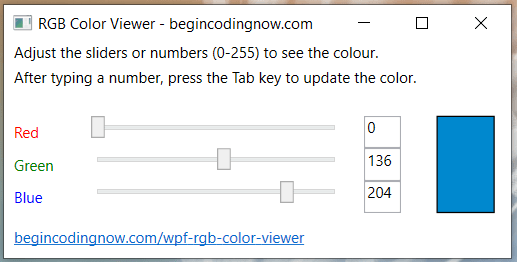
How do you create a program like this in WPF?
Here is the XAML source code.
<Window x:Class="RGBColorViewer.MainWindow"
        xmlns="http://schemas.microsoft.com/winfx/2006/xaml/presentation"
        xmlns:x="http://schemas.microsoft.com/winfx/2006/xaml"
        xmlns:d="http://schemas.microsoft.com/expression/blend/2008"
        xmlns:mc="http://schemas.openxmlformats.org/markup-compatibility/2006"
        xmlns:local="clr-namespace:TwoWayConverter"
        mc:Ignorable="d"
        WindowStartupLocation="CenterScreen"
        Title="RGB Color Viewer - begincoding.now" Height="210" Width="400" MinWidth="350" MinHeight="210">
    <StackPanel>
        <Label Margin="8,0" Height="20" Padding="0">Adjust the sliders or numbers (0-255) to see the colour.</Label>
        <Label Margin="8,0,3,16" Height="20" Padding="0">After typing a number, press the
            Tab key to update the color.</Label>
        <Grid Margin="3">
            <Grid.ColumnDefinitions>
                <ColumnDefinition Width="5*"/>
                <ColumnDefinition/>
            </Grid.ColumnDefinitions>
            <Rectangle Name="Rect" Grid.Row="1" Grid.Column="1" Margin="10,0" Stroke="Black" Fill="Black"></Rectangle>
            <Grid Grid.Column="0">
                <Grid.ColumnDefinitions>
                    <ColumnDefinition/>
                    <ColumnDefinition Width="3*"/>
                    <ColumnDefinition/>
                </Grid.ColumnDefinitions>
                <Grid.RowDefinitions>
                    <RowDefinition/>
                    <RowDefinition/>
                    <RowDefinition/>
                </Grid.RowDefinitions>
                <Label Grid.Row="0" Grid.Column="0" Content="Red" Foreground="Red"/>
                <Label Grid.Row="1" Grid.Column="0" Content="Green" Foreground="Green"/>
                <Label Grid.Row="2" Grid.Column="0" Content="Blue" Foreground="Blue"/>
                <Slider Name="sliderRed" Grid.Row="0" Grid.Column="1" Maximum="255" Minimum="0" SmallChange="1" LargeChange="10" ValueChanged="slider_ValueChanged"/>
                <Slider Name="sliderGreen" Grid.Row="1" Grid.Column="1" Maximum="255" Minimum="0" SmallChange="1" LargeChange="10" ValueChanged="slider_ValueChanged"/>
                <Slider Name="sliderBlue"  Grid.Row="2" Grid.Column="1" Maximum="255" Minimum="0" SmallChange="1" LargeChange="10" ValueChanged="slider_ValueChanged"/>
                <TextBox Name="textBoxRed" Grid.Row="0" Grid.Column="2" HorizontalAlignment="Center" Width="30">
                    <TextBox.Text>
                        <Binding ElementName="sliderRed" Path="Value">
                            <Binding.Converter>
                                <local:DisplayTwoDecPlaces>
                                </local:DisplayTwoDecPlaces>
                            </Binding.Converter>
                        </Binding>
                    </TextBox.Text>
                </TextBox>
                <TextBox Name="textBoxGreen" Grid.Row="1" Grid.Column="2" HorizontalAlignment="Center" Width="30">
                    <TextBox.Text>
                        <Binding ElementName="sliderGreen" Path="Value">
                            <Binding.Converter>
                                <local:DisplayTwoDecPlaces>
                                </local:DisplayTwoDecPlaces>
                            </Binding.Converter>
                        </Binding>
                    </TextBox.Text>
                </TextBox>

                <TextBox Name="textBoxBlue" Grid.Row="2" Grid.Column="2" HorizontalAlignment="Center" Width="30">
                    <TextBox.Text>
                        <Binding ElementName="sliderBlue" Path="Value">
                            <Binding.Converter>
                                <local:DisplayTwoDecPlaces>
                                </local:DisplayTwoDecPlaces>
                            </Binding.Converter>
                        </Binding>
                    </TextBox.Text>
                </TextBox>
            </Grid>
        </Grid>
        <Label Margin="3">
            <Hyperlink NavigateUri="https://begincodingnow.com/wpf-rgb-color-viewer/" RequestNavigate="Hyperlink_RequestNavigate">
                begincodingnow.com/wpf-rgb-color-viewer
            </Hyperlink>
        </Label>
    </StackPanel>
</Window>
Here is the procedural C# code.
using System.Windows;
using System.Windows.Data;
using System.Windows.Media;
using System.Diagnostics;
using System.Windows.Navigation;
namespace RGBColorViewer
{
    public partial class MainWindow : Window
    {
        public MainWindow()
        {
            InitializeComponent();
        }
        private void UpdateRectangleColour()
        {
            string redStringValue, greenStringValue, blueStringValue;
            byte redByteValue, greenByteValue, blueByteValue;
            // get the values in the text boxes as strings and then convert
            // to bytes and store in variables of type byte.
            redStringValue = textBoxRed.Text;
            byte.TryParse((string)redStringValue, out redByteValue);
            greenStringValue = textBoxGreen.Text;
            byte.TryParse((string)greenStringValue, out greenByteValue);
            blueStringValue = textBoxBlue.Text;
            byte.TryParse((string)blueStringValue, out blueByteValue);
            // Update the colour of the rectangle
            Rect.Fill = new SolidColorBrush(Color.FromRgb(redByteValue, greenByteValue, blueByteValue));
        }
        private void sliderRed_ValueChanged(object sender, RoutedPropertyChangedEventArgs<double> e)
        {
            UpdateRectangleColour();
        }
        private void sliderGreen_ValueChanged(object sender, RoutedPropertyChangedEventArgs<double> e)
        {
            UpdateRectangleColour();
        }
        private void sliderBlue_ValueChanged(object sender, RoutedPropertyChangedEventArgs<double> e)
        {
            UpdateRectangleColour();
        }
        private void slider_ValueChanged(object sender, RoutedPropertyChangedEventArgs<double> e)
        {
            UpdateRectangleColour();
        }
        public void Hyperlink_RequestNavigate(object sender, RequestNavigateEventArgs e)
        {
            Process.Start(new ProcessStartInfo(e.Uri.AbsoluteUri));
            e.Handled = true;
        }
    }
    [ValueConversion(typeof(double), typeof(string))]
    public class DisplayTwoDecPlaces
    {
        public object Convert(object value, System.Type targetType,
                object parameter, System.Globalization.CultureInfo culture)
        {   // slider was moved
            // convert from double to a string with no decimal places
            double dValue = (double)value;
            return dValue.ToString("F0");  // F1 is one decimal place and so on.
        }
        public object ConvertBack(object value, System.Type targetType,
        object parameter, System.Globalization.CultureInfo culture)
        {   // text box changed
            // convert from string to double
            double dValue;
            double.TryParse((string)value, out dValue);
            return dValue;
        }
    }
}
For the hyperlink to work you will need to ensure you have the two using statements and also the method.
using System.Diagnostics;
using System.Windows.Navigation;
...
        public void Hyperlink_RequestNavigate(object sender, RequestNavigateEventArgs e)
        {
            Process.Start(new ProcessStartInfo(e.Uri.AbsoluteUri));
            e.Handled = true;
        }