WPF has a Hyperlink element that acts a bit like the hyperlinks in HTML. Hyperlinks can be embedded inside the TextBlock element. Content is automatically rendered as a clickable hyperlink that navigates the current page to the target page. The NaviagteUri property can be set to a XAML page within the project. If you want it to go out to a webpage in the user’s browser then set the NavigateUri property to a URL, something like “http://google.com”. Also set an event. Set the RequestNavigate event to “Hyperlink_RequestNavigate”. The code for the RequestNavigate event is shown below.
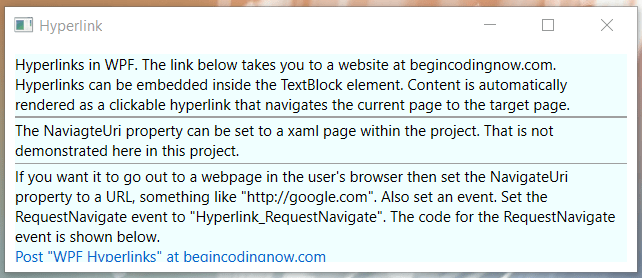
Here is the xaml code for the project that produces the above results.
<Window x:Class="Hyperlink.MainWindow"
        xmlns="http://schemas.microsoft.com/winfx/2006/xaml/presentation"
        xmlns:x="http://schemas.microsoft.com/winfx/2006/xaml"
        xmlns:d="http://schemas.microsoft.com/expression/blend/2008"
        xmlns:mc="http://schemas.openxmlformats.org/markup-compatibility/2006"
        xmlns:local="clr-namespace:Hyperlink"
        mc:Ignorable="d"
        WindowStartupLocation="CenterScreen"
        Title="Hyperlink" Height="220" Width="520">
    <StackPanel Background="Azure" Margin="8">
        <TextBlock TextWrapping="Wrap">Hyperlinks in WPF. The link below takes you to a website at
        begincodingnow.com. Hyperlinks can be embedded inside the TextBlock element. Content is automatically rendered as
        a clickable hyperlink that navigates the current page to the target page.</TextBlock>
        <Separator/>
        <TextBlock TextWrapping="Wrap">The NaviagteUri property can be set to a xaml page within the project.
            That is not demonstrated here in this project.</TextBlock>
        <Separator/>
        <TextBlock TextWrapping="Wrap">If you want it to go out to a webpage in the user's browser then set the
        NavigateUri property to a URL, something like "http://google.com". Also set an event. Set the RequestNavigate event
        to "Hyperlink_RequestNavigate". The code for the RequestNavigate event is shown below.</TextBlock>
        <TextBlock TextWrapping="Wrap">
            <Hyperlink NavigateUri="https://begincodingnow.com/wpf-hyperlinks/"
                       RequestNavigate="Hyperlink_RequestNavigate">
               Post "WPF Hyperlinks" at begincodingnow.com
            </Hyperlink>
        </TextBlock>
    </StackPanel>
</Window>
Below is the code behind. Notice the method Hyperlink_RequestNavigate and the using statement using System.Windows.Navigation.
using System.Diagnostics;
using System.Windows;
using System.Windows.Navigation;
namespace Hyperlink
{
    public partial class MainWindow : Window
    {
        public MainWindow()
        {
            InitializeComponent();
        }
        private void Hyperlink_RequestNavigate(object sender, RequestNavigateEventArgs e)
        {
            Process.Start(new ProcessStartInfo(e.Uri.AbsoluteUri));
            e.Handled = true;
        }
    }
}